Keeping track of a 90-second jog should not require this much concentration.
But when I started training for a 5K, I kept running into the same problem: I was trying to remember when to jog, when to walk, and how many intervals I had left, while also trying to catch my breath. Afterward, I had a different question: how much of that workout had I actually spent running?
That turned into RunWalk, my first iPhone and Apple Watch app. It started as a way to understand my own workouts and grew into a training plan on my wrist, an iPhone app that separates running from walking, and a web dashboard for tracking progress.
I had never built an iOS or watchOS app before. That was part of the appeal.
A Small Problem Worth Building For
My goal is the Austin 5K in February 2027. I’m starting with run/walk intervals: jog a little, walk a little, and gradually build up the running.
On October 22, my first outing covered 3.16 miles in about 47 minutes. Only about 18 minutes of that was running. The overall workout was useful to record, but its average pace mixed together the jogs, walking breaks, warm-up, and cooldown.
I wanted answers to three specific questions:
- When do I switch? I didn’t want to watch a timer or count intervals.
- What did I actually do? How many jogs, how much running, and how long was the longest one?
- Am I making progress? Not just getting faster, but completing the plan with more control and less effort.
I looked at logging apps, interval timers, and ways to move workout data into Notion. I didn’t find a setup that combined the automatic run/walk breakdown I wanted with my plan and progress tracking. Rather than keep stitching tools together, I decided to build something around that workflow.
From a Morning Run to an App on My Phone
I went for that first run in the morning. By early afternoon, I had a SwiftUI app on my iPhone reading my workouts from HealthKit.
The first day’s commits tell the story: workout charts and JSON export, then run/walk detection, background processing, post-run check-ins, an API, and a dashboard. The dashboard commit landed at 2:25 p.m.
That was a working first version, not a finished product. Getting the data onto a screen was much easier than making the app reliable after an actual run.
The project ended up with a few pieces:
- Swift and SwiftUI for the iPhone app and a small Watch companion.
- HealthKit for reading workouts and their recorded samples.
- WorkoutKit for scheduling structured jog/walk sessions on the Watch.
- TypeScript, a Cloudflare Worker, and D1 for the API and web dashboard.
- A Notion mirror to keep my workout records alongside my other notes.
The dashboard is private, behind Cloudflare Access. I wanted a place to review my health data, not a public feed of everywhere I run.
Teaching It to Tell Running From Walking
The most interesting part was turning one recorded workout into a sequence of runs, walks, and stops.
In my recordings, the signals were fairly distinct: walking was around 105 steps per minute, while running was closer to 170. Speed changed too. Those were useful observations from my data, not universal definitions of running.
The detector combines cadence and speed, looks for slower and faster groups within a workout, and avoids flipping labels every time a reading wobbles near the boundary. Very short segments get merged rather than becoming a new interval.
One early bug was especially instructive: a walk with slower and brisker stretches could also produce two groups. Finding a faster group doesn’t automatically mean you’ve found running. The detector needed checks for that case, not just a way to divide the samples in two.
I also needed a way to check the boundaries against something other than the detector’s own output. During a workout, I could double-tap the Watch’s Workout screen when I switched between jogging and walking. Those manual marks gave me reference points.
On my October 25 workout, all five manual marks were within 10 seconds of a detected switch. That’s a useful check on one workout, not a claim that the detector is accurate for every runner or every condition.
There was another catch: automatic mile and kilometer splits also appeared as segment events. The app had to distinguish those from my intentional taps before the comparison meant anything.
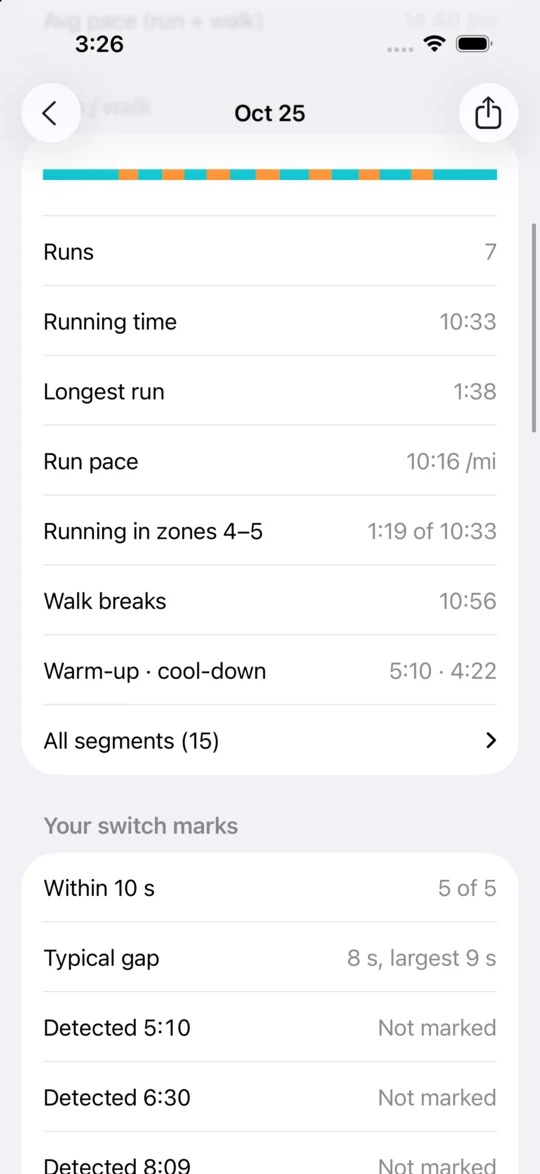
The detector lives in a plain Swift package, separate from HealthKit and the UI. Exported workouts can become regression fixtures, so I can change the algorithm and check whether an old problem comes back without going outside for another run.
The Feature I Actually Needed: Stop Making Me Count
Analyzing a workout afterward was satisfying. It didn’t solve the original problem while I was out running.
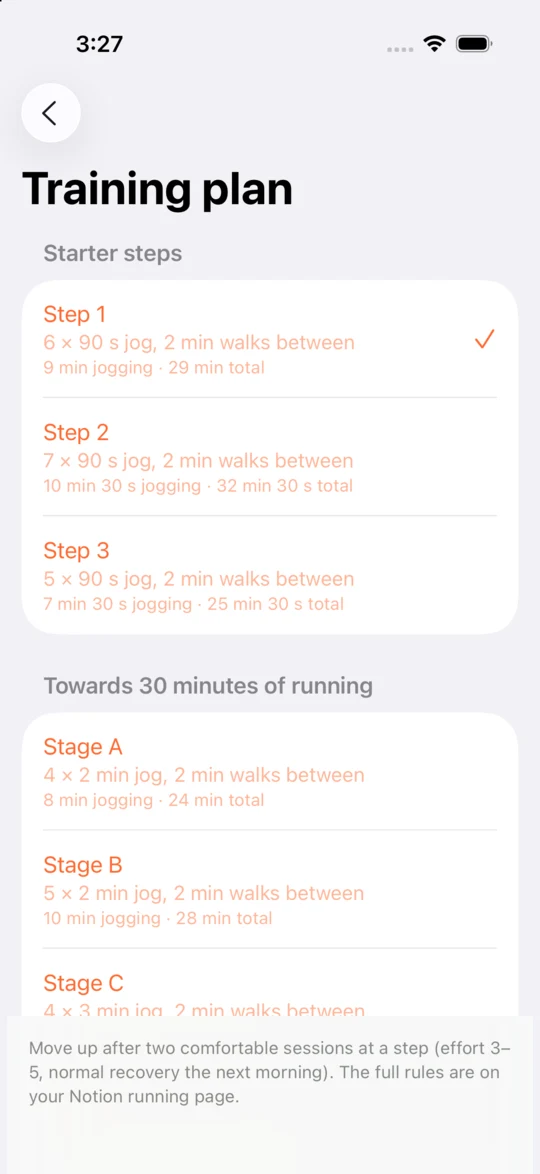
The training plan now lives in the app. WorkoutKit schedules the next structured session on my Watch, which cues me when it’s time to jog or walk. My starter session is six 90-second jogs with two-minute walking breaks between them, plus a warm-up and cooldown.
Starting a scheduled workout still took more taps than I wanted, so I built a tiny watchOS companion with one job: show the next session and give me a Start button. The workout itself runs through Apple’s Workout app; I didn’t need to build a replacement workout recorder.
That distinction helped keep the scope manageable. I wanted fewer things to think about on a run, not more features to operate on my wrist.
Things I Learned the Hard Way
Some of the most memorable work had very little to do with drawing screens.
A Hot Phone Is Feedback Too
At one point, the app kept trying to analyze old workouts from 2022. A Health query hung for more than nine minutes, and the work started again on subsequent launches. My phone got hot.
That made limiting the workout history and handling stalled work much more important than another chart. A background feature that keeps retrying expensive work isn’t quietly helpful; it’s a battery problem.
Background Processing Isn’t a Promise
After one run, the system logs included this message:
Energy Budget Policy: Must Not ProceedI had written code to process a workout in the background. iOS had other priorities.
I also ran into Health data being unavailable while the phone was locked. The app needed to defer work and retry after unlocking, rather than treat every failed read as a permanent failure. “Works when I open the app” and “reliably catches up after my run” turned out to be different milestones.
Shipping Has Its Own Bugs
Xcode wouldn’t see my Watch, so I used TestFlight to get builds onto it. Then an upload failed with the wonderfully specific message “Copy failed.”
The culprit was Homebrew’s newer rsync taking precedence over Apple’s version in my environment. I was learning a new platform, but that particular problem came from a familiar place: which executable was actually being run.
Building With AI, Testing on My Wrist
AI agents were a big part of how I got from an idea to something usable so quickly. I used ChatGPT for the initial brainstorm, Claude’s desktop app and Claude Code for much of the implementation, and Codex for run reviews, training-plan discussions, and parallel features. T3 Code helped me work across those conversations.
But the most useful loop wasn’t “generate more code.” It was:
- Pick one problem from my last run.
- Build a small change.
- Check it against recorded data or on the device.
- Go running and find out what still gets in the way.
The agents could help implement detection and synchronization. They couldn’t tell me whether starting a workout was annoying while I was standing outside, or whether counting intervals was still distracting me. I had to use the thing.
Progress Isn’t Just Pace
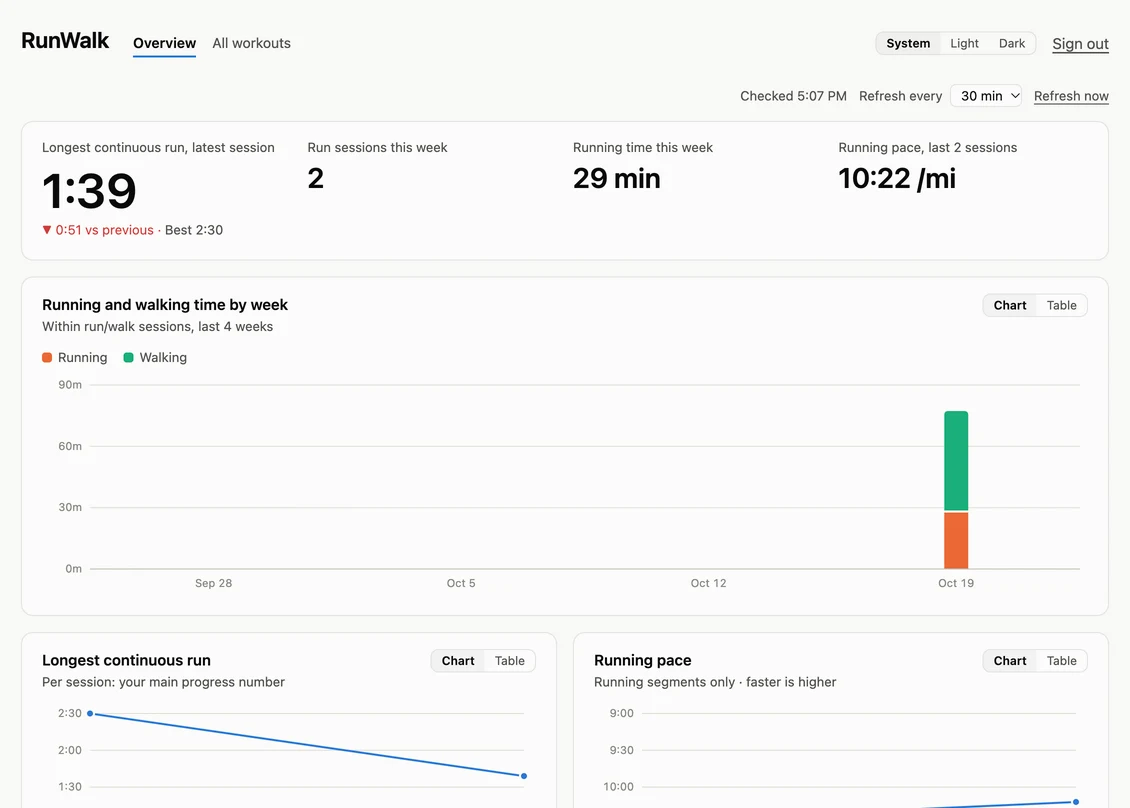
The dashboard gives me a place to look across workouts instead of opening individual records in several apps. It tracks running time, longest continuous jog, running-only pace, and weekly activity. My check-ins add how hard a session felt.
My effort check-ins for October 22, October 25, October 28, and November 1 were 7, 6, 5, and 4 out of 10.
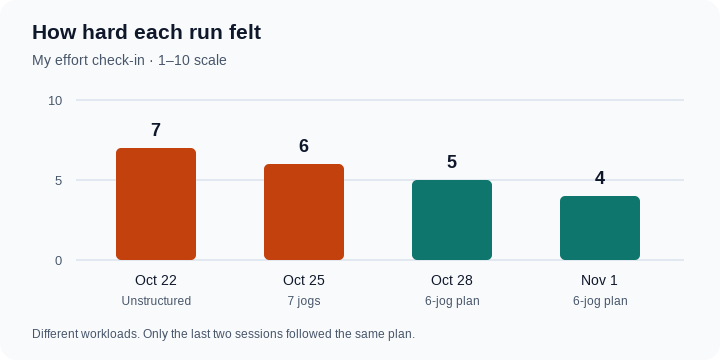
Those numbers need context. My first outing included about 18 minutes of running; the structured six-jog session targets nine. Lower effort across those different workouts doesn’t, by itself, prove improved fitness.
The more useful comparison is between sessions following the same plan. On October 28 and November 1, I completed all six jogs, and the later session felt easier. It’s a small amount of data, affected by pace, conditions, and recovery, but it’s much closer to the question I care about: can I repeat this comfortably before I ask myself to do more?
That’s what I wanted RunWalk to help me see. Not a faster number at any cost, but a clearer picture of what I did and how it felt.
I set out to train for a 5K and ended up building an iPhone app, a Watch companion, an API, and a dashboard. The best feature is still the simplest one: when it’s time to walk, I don’t have to remember. My Watch tells me.